Currently it seems at though the textContentType parameter is really only influencing the the quick type bar and isn't affecting the heuristics that drive strong password autofill. It would make configuring interfaces that don't exactly match what is expected much easier and more reliable if this parameter was taken into consideration.
It seems as though textfields flagged as secure entry and not a .newPassword will be auto filled with a strong password.
Steps to reproduce
1, Using the sample app (when correctly configured for associated domains)
2, Choose the menu option Complex Change Password
3, Tapping in the Current Password textfield (which is flagged as password)
4, Auto fills a strong password in both the Current Password & New Password textfields
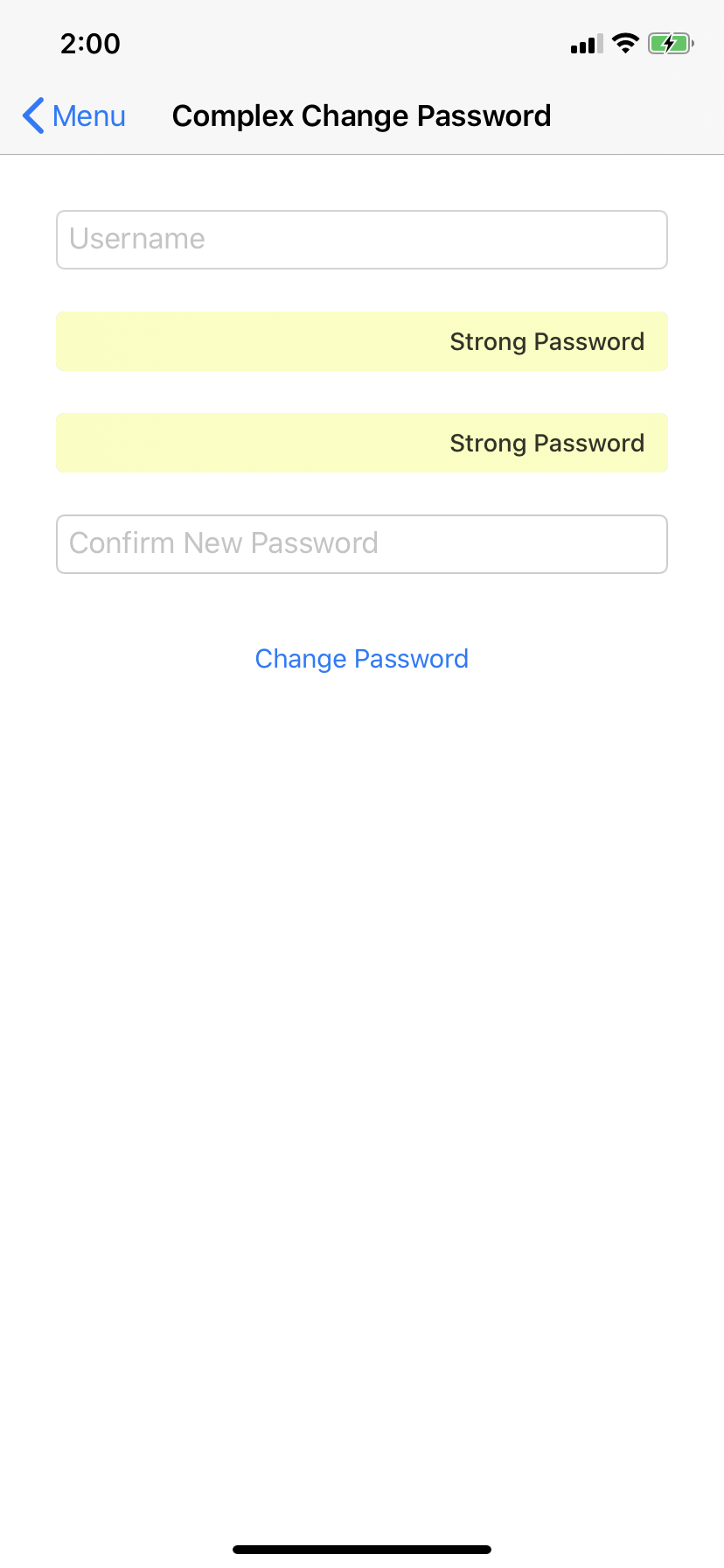
5, This doesn't really make much sense as they are both configured differently. I'm assuming the algorithm selects the first two textfields that are set to secure entry and assumes these should be filled with a strong password. The expected behaviour would be for the strong password suggestion to have been applied to only the new password and confirm new password textfields and not applied to a textfield that is flagged as password.
This makes it almost impossible to create functioning and reliable interfaces for some of or clients who require the current password to be submitted to the server when performing a password change.
Because of this we're been forced to try and prevent strong passwords from ever being suggested within the app.
Currently it seems at though the
textContentTypeparameter is really only influencing the the quick type bar and isn't affecting the heuristics that drive strong password autofill. It would make configuring interfaces that don't exactly match what is expected much easier and more reliable if this parameter was taken into consideration.It seems as though textfields flagged as secure entry and not a
.newPasswordwill be auto filled with a strong password.Steps to reproduce
1, Using the sample app (when correctly configured for associated domains)
2, Choose the menu option
Complex Change Password3, Tapping in the
Current Passwordtextfield (which is flagged aspassword)4, Auto fills a strong password in both the
Current Password&New Passwordtextfields5, This doesn't really make much sense as they are both configured differently. I'm assuming the algorithm selects the first two textfields that are set to secure entry and assumes these should be filled with a strong password. The expected behaviour would be for the strong password suggestion to have been applied to only the new password and confirm new password textfields and not applied to a textfield that is flagged as
password.This makes it almost impossible to create functioning and reliable interfaces for some of or clients who require the
current passwordto be submitted to the server when performing a password change.Because of this we're been forced to try and prevent strong passwords from ever being suggested within the app.