A ready-made solution for quick deployment of MODX in Docker containers. Perfect for local development of sites and extensions.
Before starting, make sure you have Docker installed on your computer
Clone the repository into the project directory
git clone "https://github.com/Prihod/docker-modx.git" ./Start containers
docker-compose up -dView MODX installation log
docker-compose logs -f phpThe first start can take a few minutes while MODX is unpacked and installed.
During this time, the site can temporarily return 502 Bad Gateway.
Wait until the php logs show Modx installation is complete! and ready to handle connections.
| URL | Description |
|---|---|
| http://localhost/manager | MODX Admin. Login: admin, Password: admin |
| http://localhost:8080 | phpMyAdmin. Login: modx, Password: modx |
| http://localhost:8025 | MailHog |
| http://localhost:8181 | XHGui (optional) |
- Configurable PHP version
- Automatic MODX installation/update
- Data export/import with auto path correction
- Database management through phpMyAdmin
- Email testing via MailHog
- Self-signed SSL certificate
- SSH access
- Xdebug support
- Profiling through Xhprof + XHGui
- Integration with Blackfire
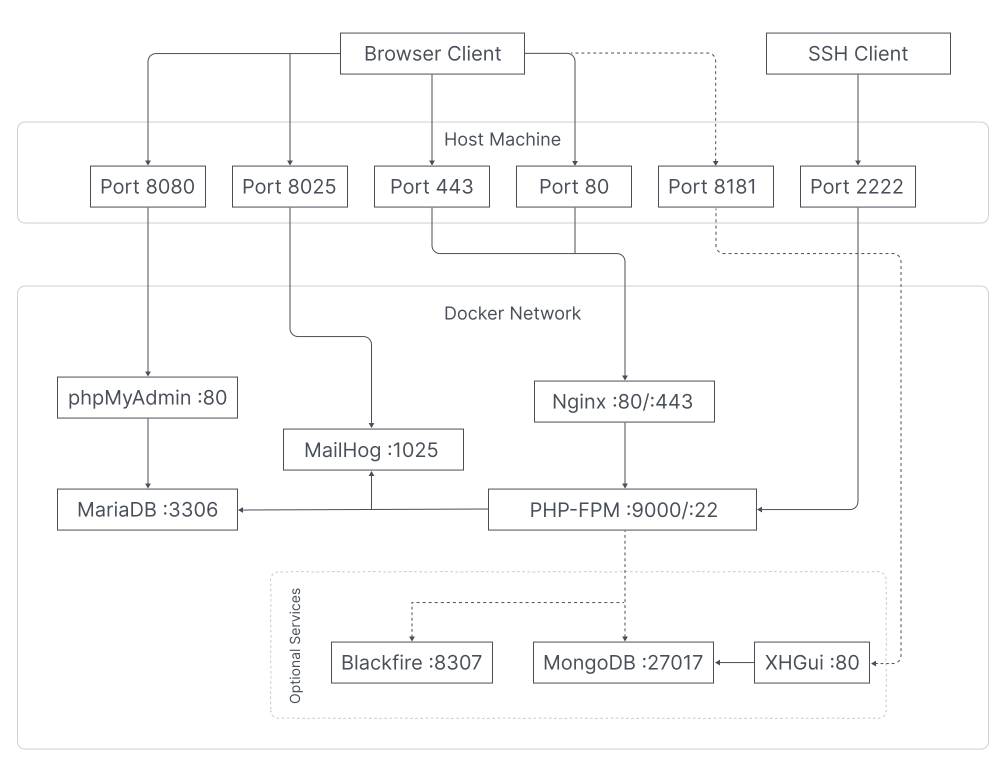
Show structure
.
|-- .env
|-- .gitignore
|-- README.md
|-- docker
|   |-- logs
|   |   |-- nginx
|   |   `-- php
|   |-- mariadb
|   |   `-- conf
|   |       `-- custom.cnf
|   |-- modx
|   |   |-- storage
|   |   |   |-- backup
|   |   |   `-- cache
|   |   `-- tools
|   |       `-- configurator
|   |           |-- composer.json
|   |           |-- config.inc.php
|   |           |-- example.config.inc.php
|   |           |-- run.php
|   |           |-- src
|   |           |   |-- Runner
|   |           |   |   |-- Runner.php
|   |           |   |   `-- RunnerInterface.php
|   |           |   |-- Tasks
|   |           |   |   |-- GrantAccessUserTask.php
|   |           |   |   |-- InstallPackagesTask.php
|   |           |   |   |-- MiniShop3Task.php
|   |           |   |   |-- SetOptionsTask.php
|   |           |   |   |-- Task.php
|   |           |   |   |-- TaskInterface.php
|   |           |   |   `-- TransportProvidersTask.php
|   |           |   |-- Traits
|   |           |   |   |-- DocumentTrait.php
|   |           |   |   |-- ElementsTrait.php
|   |           |   |   |-- InitializeTrait.php
|   |           |   |   |-- OptionTrait.php
|   |           |   |   |-- PropertiesTrait.php
|   |           |   |   |-- SecurityTrait.php
|   |           |   |   `-- TransportProviderTrait.php
|   |           |   `-- Utils
|   |           |       `-- Logger.php
|   |           `-- storage
|   |               `-- ms3
|   |                   |-- pages
|   |                   |   |-- cart.tpl
|   |                   |   |-- category.tpl
|   |                   |   |-- order.tpl
|   |                   |   `-- thanks.tpl
|   |                   `-- templates
|   |                       |-- base.tpl
|   |                       |-- cart.tpl
|   |                       |-- catalog.tpl
|   |                       |-- order.tpl
|   |                       |-- product.tpl
|   |                       `-- thanks.tpl
|   |-- nginx
|   |   |-- default.conf.template
|   |   `-- ssl
|   |-- php
|   |   |-- Dockerfile
|   |   |-- conf
|   |   |   |-- opcache.ini
|   |   |   |-- php.ini
|   |   |   |-- xdebug.ini
|   |   |   `-- xhprof.ini
|   |   |-- sh
|   |   |   |-- modx-clear-db.sh
|   |   |   |-- modx-clear-site.sh
|   |   |   |-- modx-configure.sh
|   |   |   |-- modx-docker-start.sh
|   |   |   |-- modx-download.sh
|   |   |   |-- modx-export.sh
|   |   |   |-- modx-generate-ssl.sh
|   |   |   |-- modx-import.sh
|   |   |   |-- modx-install.sh
|   |   |   |-- modx-uninstall.sh
|   |   |   `-- modx-upgrade.sh
|   |   `-- xhprof
|   |       |-- composer.json
|   |       `-- handler.php
|   |-- volume
|   |   `-- mariadb
|   `-- xhgui
|       |-- Dockerfile
|       |-- apache.conf
|       |-- config.php
|       `-- mongo.init.d
|           `-- xhgui.js
|-- docker-compose.override.blackfire.yml
|-- docker-compose.override.xhprof.yml
|-- docker-compose.yml
`-- www
- GD, PDO, MySQLi
- ImageMagick, PCNTL
- Redis, OPcache, Fileinfo
- Xdebug (optional)
- Xhprof (optional)
- Blackfire (optional)

MODX_RESET=1 docker-compose up -ddocker-compose exec php modx-export.shData is saved in ./docker/modx/storage/backup
Import from latest archive
MODX_IMPORT=latest docker-compose up -dImport from specific archive
MODX_IMPORT=<archive_name> docker-compose up -dThe import archive should be located in the ./docker/modx/storage/backup directory with the export file structure.
ssh dev@127.0.0.1 -p 2222 # Login: dev, Password: devAll project settings are in the .env file. Below are the main parameters:
| Name | Default Value | Description |
|---|---|---|
| PHP_VERSION | 8.4 | PHP-FPM version |
| MODX_VERSION | 3.2.1-pl | MODX version |
| MODX_INSTALL_ENABLE | 1 | Automatically install MODX |
| MODX_USE_CACHE_SOURCE | 1 | Save MODX setup archive |
| MODX_CONFIGURE_ENABLE | 0 | Run configuration script after MODX installation |
| MODX_CONFIGURE_DEV_MODE | 0 | Dev mode for MODX configuration script |
| MODX_TABLE_PREFIX | random:8 | Database table prefix. When set to random:number, generates a random string with specified number of characters |
| MODX_HTTP_HOST | localhost | Site hostname |
| MODX_LANGUAGE | en | MODX installation language |
| MODX_CMS_ADMIN | admin | MODX administrator login |
| MODX_CMS_PASS | admin | MODX administrator password |
| MODX_IMPORT_DB | 1 | Import MODX database |
| MODX_IMPORT_SITE | 1 | Import MODX files |
| MODX_EXPORT_DB | 1 | Export MODX database |
| MODX_EXPORT_SITE | 1 | Export MODX files |
| MODX_EXPORT_OVERWRITE_CONFIG | 0 | Overwrite configuration files data during export with values from MODX_EXPORT_... variables |
| XDEBUG_ENABLE | 0 | Install Xdebug extension for PHP-FPM |
| XHPROF_ENABLE | 0 | Install Xhprof extension for PHP-FPM |
| SSH_ENABLE | 1 | Enable SSH for php container |
| SSL_GENERATE | 1 | Generate self-signed SSL certificate |
| NGINX_PORT | 80 | NGINX port |
| MARIADB_PORT | 3306 | MariaDB port |
| PHPMYADMIN_PORT | 8080 | phpMyAdmin port |
| MAILHOG_PORT | 8025 | MailHog port |
| SMTP_PORT | 1025 | SMTP port |
| SMTP_HOST | mailhog | SMTP host |
When MODX_CONFIGURE_ENABLE = 1, the configuration script from ./docker/modx/tools/configurator/run.php runs after installation.
The script executes tasks specified in the config.inc.php configuration file in the tasks option.
When MODX_CONFIGURE_DEV_MODE = 1, after completing all tasks, MODX cache and logs won't be cleared, and the ./www/core/configurator directory won't be deleted, allowing manual configuration script execution during development.
docker-compose exec php bash && php /var/www/html/core/configurator/run.php| Name | Key with options in config.inc.php | Description |
|---|---|---|
| TransportProvidersTask | transport_providers | Adding transport providers |
| InstallPackagesTask | install_packages | Installing packages |
| SetOptionsTask | set_options | Configuring system parameters |
| GrantAccessUserTask | grant_access_user | Setting up access rights |
| MiniShop3Task | ms3 | Setting up miniShop3 store (optionally with demo data) |
- Create a class in
./docker/modx/tools/configurator/src/Tasks - Inherit it from the
Taskclass - Implement
getNameandexecutemethods - Add the task to
config.inc.php
Output all options from config.inc.php to MODX log:
<?php

namespace App\Tasks;

use App\Utils\Logger;

class DemoLogTask extends Task
{
    public function getName(): string
    {
        return 'Demo log';
    }

    public function execute(): void
    {
        Logger::info("Start execute my task!");
        $this->modx->log(\modX::LOG_LEVEL_ERROR, print_r($this->getProperties(), 1));
        Logger::info("Finish execute my task!");
    }
}XDEBUG_ENABLE=1XHPROF_ENABLE=1
# + rename docker-compose.override.xhprof.yml to docker-compose.override.ymlBLACKFIRE_ENABLE=1
BLACKFIRE_CLIENT_ID=<client_id>
BLACKFIRE_CLIENT_TOKEN=<client_token>
BLACKFIRE_SERVER_ID=<server_id>
BLACKFIRE_SERVER_TOKEN=<server_token>
# + rename docker-compose.override.blackfire.yml to docker-compose.override.ymlWhen changing configuration, rebuild the container:
docker-compose build --no-cache phpThis error means MODX installation did not finish, so core/config/config.inc.php was not created.
- Rebuild the
phpcontainer (required after updating startup scripts):docker-compose build --no-cache php
- Start containers and watch installation logs:
docker-compose up -d
docker-compose logs -f php
- Wait for these lines in logs:
Modx installation is complete!ready to handle connections
- If needed, force a clean reinstall:
MODX_RESET=1 docker-compose up -d
| Command | Description |
|---|---|
| Docker | |
docker ps |
Shows running containers. |
docker restart <container_id> |
Restarts a container. |
docker logs <container_id> |
Shows container logs. |
docker exec -it <container_id> bash |
Opens terminal inside container. |
docker system prune |
Removes unused data (containers, images, volumes, networks). |
| Docker Compose | |
docker-compose up |
Starts all services specified in docker-compose.yml. |
docker-compose up -d |
Starts services in background mode. |
docker-compose down |
Stops and removes services, networks, volumes created by up. |
docker-compose restart |
Restarts all services. |
docker-compose ps |
Shows list of running services. |
docker-compose logs |
Shows logs of all services. |
docker-compose logs --tail <number> |
Shows last <number> lines of logs for all services. |
docker-compose logs -f <service_name> |
Shows and follows log stream for specified service. |
docker-compose logs -f --tail <number> <service_name> |
Shows and follows log stream for specified service, starting from last <number> lines. |
docker-compose exec <service_name> bash |
Opens terminal inside specified service. |
docker-compose build |
Builds images for services from docker-compose.yml. |
docker-compose build --no-cache |
Builds images without using cache. |
docker-compose build --no-cache <service_name> |
Builds image for specified service without using cache. |
docker-compose top |
Shows processes running in services. |